


Adding Compile and Link Commands for DCAL to UltraEdit
UltraEdit has the ability to be configured to operate as a fairly
powerful Integrated Development Environment (IDE) for programming. You
may be familiar with high priced tools for other languages like C++
or Visual Basic, well with some tweaking you can create you own IDE
for DCAL using UltraEdit. By using the Keyword highlighting features
and the ability to create your own macros to call the DCAL compiler
you can have a one stop code editing and compiling tool. Here is how
to configure the macros...
Under the Advanced menu item select Tool Configuration. You will be
presented with a dialog.
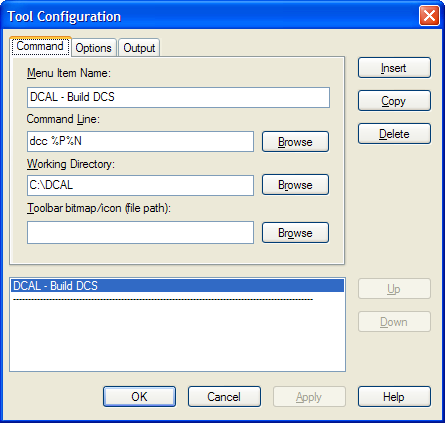
Enter the command you wish to execute in the Command Line field.
For example to compile a DCAL source file (*.dcs), insert the command:
dcc %P%N. The %P%N inserts the current file path and name automatically.
Enter the path to the DCAL compiler and/or linker (DCC.exe or DCL.exe)
in the Working Directory field.
Typically, this is something like C:\DATACAD\DCAL.
Enter a name to appear on the Advanced menu. For example, 'DCAL - Build
DCS'.
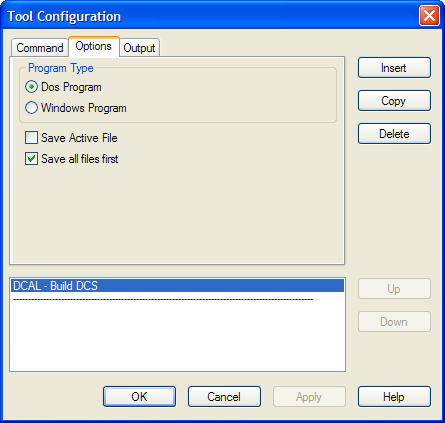
Select the 'DOS Program' Program Type.
Check the 'Save all files first' checkbox to ensure recent changes are
saved prior to compilation or linking.
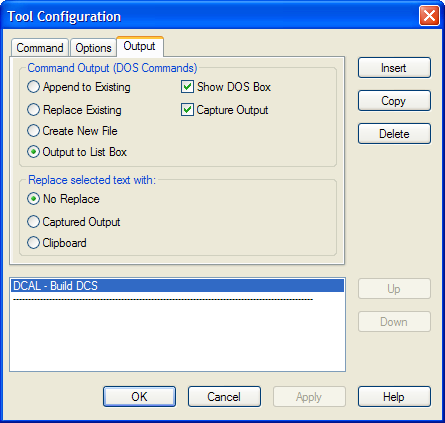
Select the 'Output to List Box' and 'Capture Output' checkboxes to have
the error codes pasted into an UltraEdit window.
Save your changes and you will now see the new macro listed under the
Advanced pull-down menu. The program will assign hotkeys to each of
your macros making it easy to compile and/or link you program on the
fly.
You can also program toolbar icons to execute your macros. Refer to
the online help for more information on setting this up.
Thank you for printing this page. Please feel free to contact us for further assistance. You can call our sales department at +1 (800) 394-2231, Monday through Friday from 8:00 a.m. to 5:00 p.m. Eastern time or send an e-mail message to info@datacad.com.